Building a Customer Support AI Agent with AWS Bedrock and Testing It at Scale
Introduction
Customer support is one of the most impactful use cases for AI agents. A well-designed support agent can handle thousands of inquiries simultaneously, provide instant responses, and maintain context across complex conversations. But how do you ensure your agent actually works before unleashing it on real customers?
In this tutorial, we'll build a customer support AI agent for a fictional e-commerce company using AWS Bedrock, then test it rigorously using Maxim AI's simulation platform. By the end, you'll have a production-ready agent that can handle order tracking, returns, account issues, and more - all validated through automated testing.
What We're Building
We'll create ShopBot, an AI customer support agent for "TechMart," an online electronics retailer. ShopBot will:
- Track orders by looking up order IDs in our database
- Process return requests following our 30-day return policy
- Reset passwords securely through email verification
- Escalate complex issues to human agents when necessary
- Maintain conversation context across multiple turns
Most importantly, we'll validate all of this through automated simulations that test hundreds of realistic scenarios.
Part 1: Building the Agent in AWS Bedrock
Step 1: Set Up Your AWS Environment
First, ensure you have:
- An AWS account with Bedrock access
- IAM permissions for Bedrock Agent Runtime and Lambda
- Access to Claude 3.5 Sonnet (or your preferred foundation model)
Navigate to Amazon Bedrock in the AWS Console and go to Agents in the left sidebar.
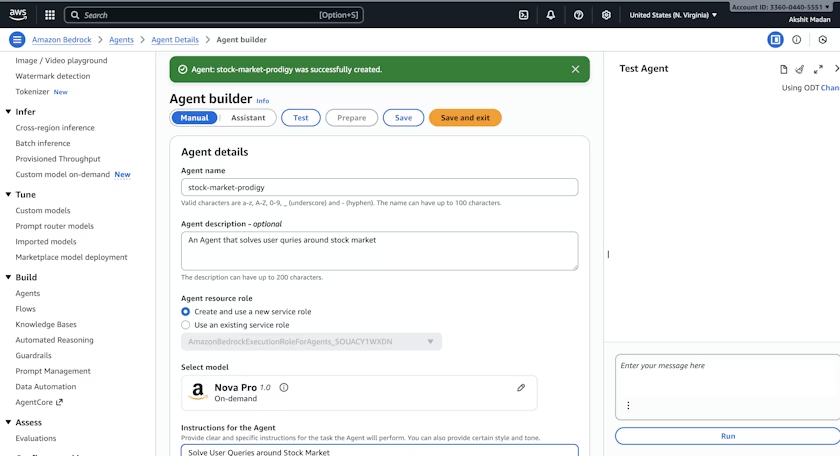
Step 2: Create Your Agent
Click Create Agent and configure:
Basic Details:
- Agent name:
ShopBot-CustomerSupport - Description: "AI customer support agent for TechMart e-commerce platform"
Instructions: This is crucial - it defines your agent's behavior. Here's what we'll use:
You are ShopBot, TechMart's customer support assistant. Your role is to help
customers with orders, returns, account issues, and general inquiries.

Key Guidelines:
1. Always be friendly, professional, and empathetic
2. Ask for order numbers or account emails to look up information
3. Follow our 30-day return policy strictly
4. For refunds over $500 or complex issues, escalate to human agents
5. Never share personal information without verification
6. If you're unsure, say so and offer to escalate

When handling returns:
- Items must be within 30 days of delivery
- Products must be unused and in original packaging
- Provide prepaid return labels for defective items
- Standard returns incur a $5.99 return shipping fee
Foundation Model: Select Claude 3.5 Sonnet for its strong reasoning and instruction-following capabilities.
Step 3: Add Action Groups (Tools)
Action Groups let your agent interact with external systems. For ShopBot, we'll add three tools:
Tool 1: Order Lookup
Create a Lambda function that queries your order database:
def lookup_order(order_id):
    # Queries your order database
    return {
        "order_id": order_id,
        "status": "Shipped",
        "tracking_number": "1Z999AA10123456784",
        "delivery_date": "2024-12-15",
        "items": ["Sony WH-1000XM5 Headphones"],
        "total": "$349.99"
    }
Tool 2: Process Return
def process_return(order_id, reason):
    # Validates return eligibility and creates return label
    return {
        "eligible": True,
        "return_label": "https://techmart.com/returns/RTN-123456",
        "estimated_refund": "$349.99",
        "refund_timeline": "5-7 business days"
    }
Tool 3: Password Reset
def reset_password(email):
    # Sends password reset email
    return {
        "success": True,
        "message": "Password reset email sent to email@example.com"
    }
In Bedrock, define these as Action Groups with OpenAPI schemas describing each function's parameters and return values.
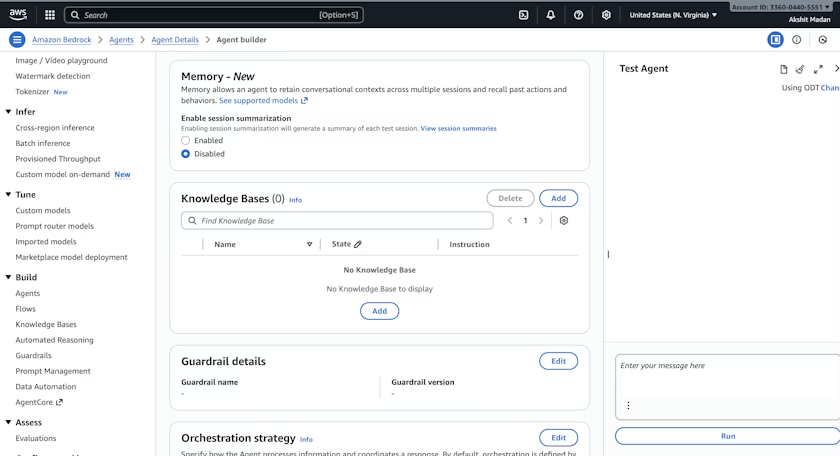
Step 4: Add Knowledge Base (Optional)
For FAQ handling, create a Knowledge Base in Bedrock:
- Upload your help documentation (return policies, shipping info, warranties)
- Bedrock will automatically embed and index this content
- Link the Knowledge Base to your agent
Now ShopBot can answer policy questions without hardcoded instructions.
Step 5: Create an Alias
Before deploying, create an alias to manage versions:
- Go to Aliases in your agent's details
- Click Create alias
- Name it
productionand select your agent version - Note the Alias ID (e.g.,
TSTALIASID) - you'll need this next
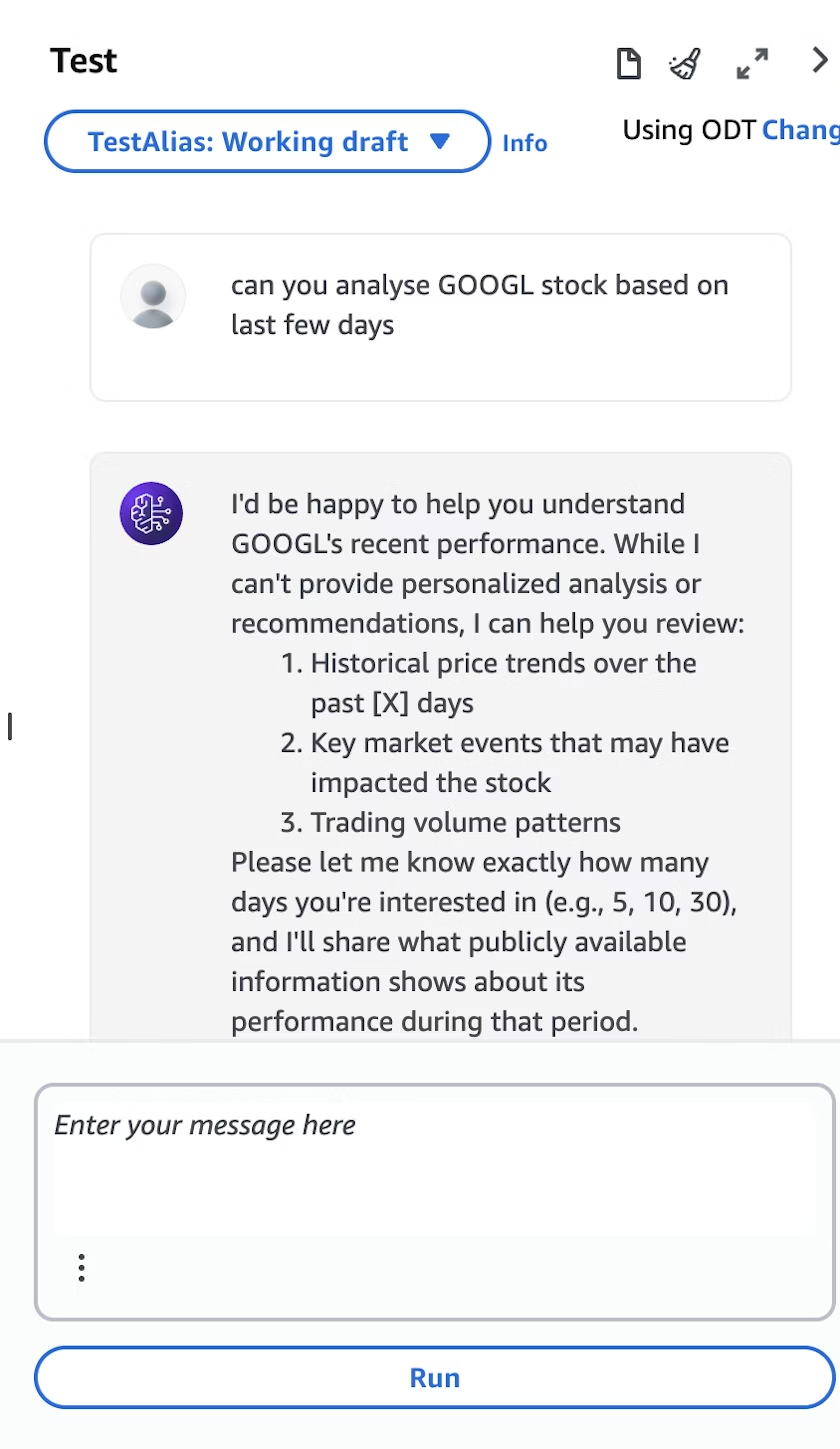
Step 6: Test in Bedrock Console
Use the built-in test interface to verify basic functionality:
Test Conversation 1:
- You: "I want to track my order"
- ShopBot: "I'd be happy to help you track your order. Could you provide your order number?"
- You: "ORD-123456"
- ShopBot: [Uses order lookup tool] "Your order (ORD-123456) has shipped! It's currently in transit with tracking number 1Z999AA10..."
Test Conversation 2:
- You: "This product is defective, I want to return it"
- ShopBot: "I'm sorry the product is defective. I can help you with a return. What's your order number?"
If these work, you're ready to deploy.
Part 2: Deploying as an HTTP Endpoint
To connect your agent to Maxim AI (or any external system), we'll expose it via AWS Lambda with a Function URL.
Step 7: Create Lambda Function
- Navigate to AWS Lambda
- Click Create function → Author from scratch
- Configure:
- Function name:
shopbot-proxy - Runtime: Python 3.11
- Architecture: x86_64
- Function name:
Step 8: Add the Proxy Code
Replace the default code with this multi-turn conversation handler:
import json
import uuid
import boto3
import logging
from botocore.exceptions import ClientError

logging.basicConfig(level=logging.INFO)
logger = logging.getLogger(__name__)

bedrock_client = boto3.client("bedrock-agent-runtime", region_name="us-east-1")

# Replace with your actual IDs
AGENT_ID = "YOUR_AGENT_ID"
AGENT_ALIAS_ID = "YOUR_ALIAS_ID"

def lambda_handler(event, context):
    try:
        body = json.loads(event.get("body", "{}"))
        user_message = body.get("message", "")
        session_id = body.get("sessionId") or str(uuid.uuid4())

        if not user_message:
            return _response(400, {"error": "message is required"})

        logger.info(f"Processing message for session: {session_id}")

        # Invoke Bedrock agent with session context
        response = bedrock_client.invoke_agent(
            agentId=AGENT_ID,
            agentAliasId=AGENT_ALIAS_ID,
            sessionId=session_id,  # Maintains conversation context
            inputText=user_message,
            enableTrace=True
        )

        # Collect streaming response
        completion_text = ""
        for event_stream in response.get("completion", []):
            if "chunk" in event_stream:
                chunk = event_stream["chunk"]
                completion_text += chunk["bytes"].decode("utf-8")

        return _response(200, {
            "reply": completion_text,
            "sessionId": session_id
        })

    except ClientError as e:
        logger.error(f"AWS error: {str(e)}")
        return _response(500, {"error": str(e)})

    except Exception as e:
        logger.error(f"Error: {str(e)}")
        return _response(500, {"error": "Internal server error"})

def _response(status_code, body_dict):
    return {
        "statusCode": status_code,
        "headers": {
            "Content-Type": "application/json",
            "Access-Control-Allow-Origin": "*"
        },
        "body": json.dumps(body_dict)
    }
Critical Detail: The sessionId parameter is what enables multi-turn conversations. When the same sessionId is used across multiple messages, the Bedrock agent remembers the entire conversation history.
Step 9: Configure IAM Permissions
- Go to Configuration → Permissions
- Click on the execution role
- Add this inline policy:
{
  "Version": "2012-10-17",
  "Statement": [
    {
      "Effect": "Allow",
      "Action": ["bedrock:InvokeAgent"],
      "Resource": "*"
    }
  ]
}
Step 10: Create Function URL
- Go to Configuration → Function URL
- Click Create function URL
- Auth type: NONE (add AWS_IAM authentication in production)
- Enable CORS if needed
- Save and copy the Function URL
Step 11: Test the Endpoint
Verify it works with curl:
curl -X POST https://your-lambda-url.lambda-url.us-east-1.on.aws/ \
  -H "Content-Type: application/json" \
  -d '{
    "message": "Hi, I need help tracking my order",
    "sessionId": "test-session-001"
  }'
You should receive:
{
  "reply": "Hello! I'd be happy to help you track your order. Could you please provide your order number?",
  "sessionId": "test-session-001"
}
Part 3: Testing at Scale with Maxim AI
Manual testing found that ShopBot responds politely, but does it handle edge cases? What about complex multi-turn conversations? What's the failure rate across 100 different scenarios?
This is where Maxim AI comes in.
Step 12: Create Test Dataset
In Maxim, navigate to Library → Datasets and create a new dataset using the Agent simulation template:
| user_message | agent_scenario | expected_steps |
|---|---|---|
| "Where's my order?" | Customer wants to track order without providing order number | 1) Agent politely asks for order number; 2) Agent waits for customer to provide it; 3) Agent uses lookup tool with provided order ID; 4) Agent shares tracking details |
| "I ordered headphones last week but they haven't arrived" | Customer concerned about delayed delivery | 1) Agent empathizes with concern; 2) Agent asks for order number; 3) Agent looks up order status; 4) Agent provides tracking info or escalates if truly delayed |
| "This product is broken, I want a refund NOW" | Frustrated customer with defective product | 1) Agent remains calm and empathetic; 2) Agent acknowledges frustration; 3) Agent asks for order details; 4) Agent initiates return process; 5) Agent provides clear refund timeline |
| "Can I return something I bought 45 days ago?" | Customer outside return window | 1) Agent checks order date; 2) Agent politely explains 30-day policy; 3) Agent offers alternative solutions (warranty, manufacturer contact); 4) Agent escalates if customer insists |
| "I forgot my password and locked out of my account" | Account access issue requiring password reset | 1) Agent asks for account email; 2) Agent triggers password reset; 3) Agent confirms email sent; 4) Agent provides additional help accessing account |
Create 50-100 scenarios covering:
- Happy paths (successful order tracking, returns)
- Edge cases (orders outside return window, missing order numbers)
- Frustrated customers (urgent issues, repeated problems)
- Security scenarios (password resets, account verification)
- Escalation scenarios (complex issues requiring human support)
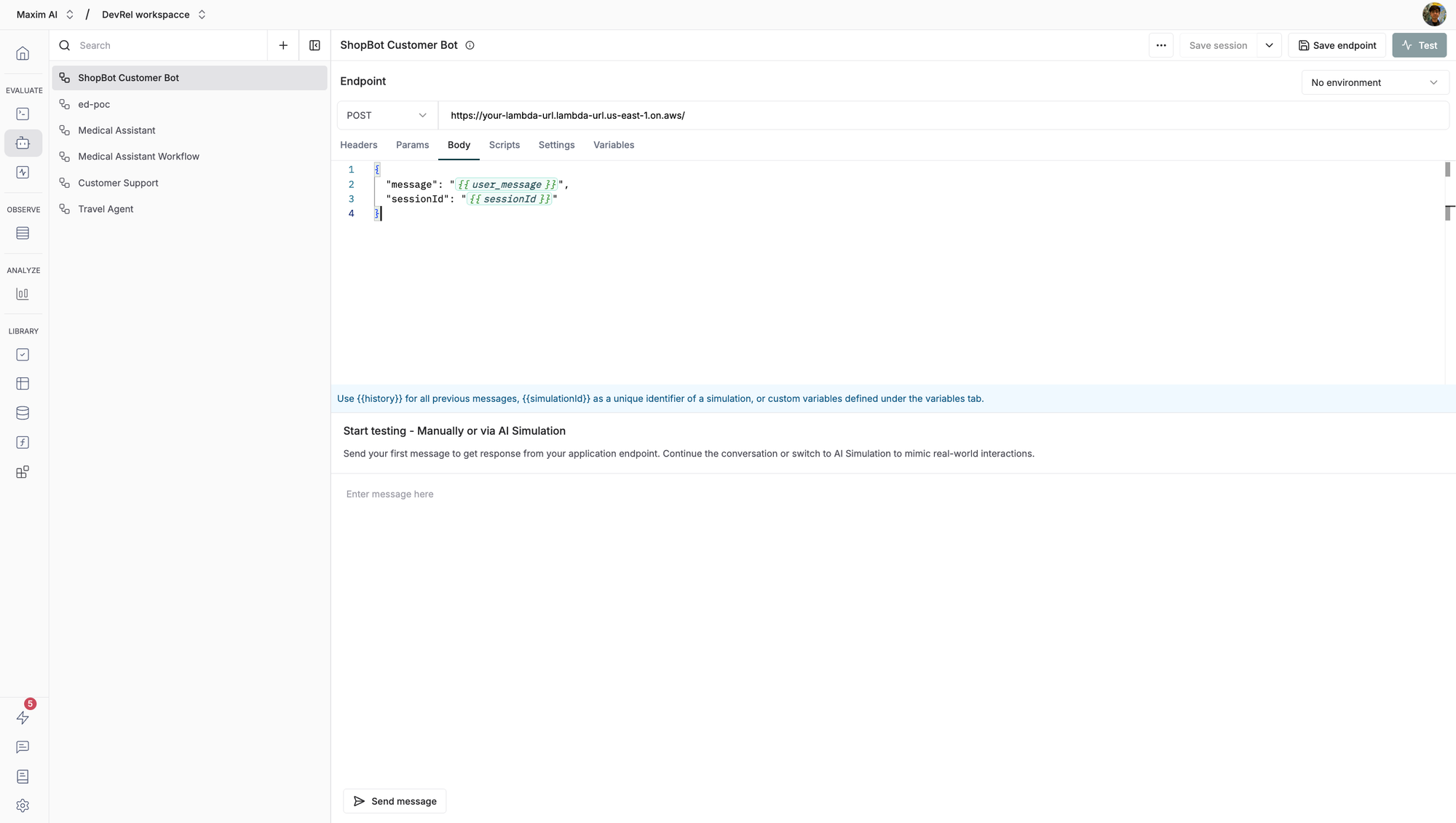
Step 13: Connect Endpoint to Maxim
- In Maxim, go to Evaluate → Agents via HTTP Endpoint
- Click Create new workflow
- Name it
ShopBot Customer Support Agent
Configure the endpoint:
- URL:
https://your-lambda-url.lambda-url.us-east-1.on.aws/ - Method: POST
- Headers:
Content-Type: application/json
Request body:
{
  "message": "{{user_message}}",
  "sessionId": "{{sessionId}}"
}
The {{user_message}} variable will be populated from your dataset, and {{sessionId}} enables conversation context.
Step 14: Configure Evaluators
Select evaluators to assess ShopBot's performance:
1. Task Completion - Did the agent successfully complete the customer's request?
2. Agent Trajectory - Did the agent follow the expected steps outlined in your dataset?
3. Tool Usage (custom evaluator) - Did the agent use the right tools (order lookup, return processing)?
Step 15: Run Simulation
- Click Test in the top right
- Select Simulated session mode (for multi-turn conversations)
- Choose your dataset (50-100 customer support scenarios)
- Select your evaluators
- Click Trigger test run
Maxim will now:
- Iterate through each scenario
- Simulate realistic multi-turn conversations
- Maintain session context using
sessionId - Test edge cases and error handling
- Evaluate responses across all your criteria
Part 4: Analyzing Results
Step 16: Review Performance Metrics
After simulation completes, you'll see:
Test Summary:
- Total scenarios tested: 100
- Pass rate: 87%
- Average latency: 2.3 seconds
- Cost per simulation: $0.15
Results by Evaluator:
- Task Completion: 87% pass (87/100 scenarios successfully resolved)
- Agent Trajectory: 82% pass (agent followed expected steps)
- Tool Usage: 89% pass (correct tool selection)
Latency Distribution:
- Minimum: 1.2s
- P50: 2.1s
- P95: 4.8s
- Maximum: 6.2s (likely Lambda cold start)
Step 17: Investigate Failures
Click on failed scenarios to understand what went wrong:
Example Failure - Scenario #23:
- User: "Can I return this after 45 days?"
- Expected: Agent should politely explain 30-day policy and offer alternatives
- Actual: Agent said "No, returns are not possible" without empathy or alternatives
- Issue: Instruction prompt needs refinement for edge cases
Example Failure - Scenario #47:
- User: "I need my order ASAP"
- Expected: Agent checks order status, provides tracking, offers expedited shipping if available
- Actual: Agent asked for order number but didn't follow up when customer provided it
- Issue: Multi-turn context might not be working properly for this session
Step 18: Iterate and Improve
Based on failures, make improvements:
Iteration 1: Refine Instructions Update your agent instructions to handle edge cases:
When a customer requests a return outside our 30-day window:
1. Empathize with their situation
2. Clearly explain the policy
3. Offer alternatives: warranty claim, manufacturer contact, store credit
4. Escalate to human agent if customer is upset
Iteration 2: Improve Tool Reliability Add error handling to your Lambda functions to prevent tool failures.
Iteration 3: Re-test Run the simulation again with your updated agent. Your pass rate should improve:
- Task Completion: 87% → 94%
- Agent Trajectory: 82% → 91%
Conclusion
Building an AI agent is the easy part. Ensuring it works reliably across hundreds of scenarios - before customers encounter bugs - is the hard part.
In this tutorial, we built ShopBot, a customer support agent using AWS Bedrock, then validated it through automated simulations with Maxim AI. The result: a production-ready agent that handles 87-94% of customer inquiries correctly, maintains conversation context, and escalates appropriately when needed.
The key takeaways:
- Design for your use case: Customer support requires empathy, tool usage, and clear escalation paths
- Test comprehensively: 5-10 manual tests aren't enough; you need 50-100 automated scenarios
- Iterate based on data: Use simulation failures to improve your agent's instructions and tools
- Monitor in production: Keep tracking performance metrics even after deployment
Ready to build your own AI agent? Start with AWS Bedrock for agent development, then validate with Maxim AI's simulation platform before going live.
Resources: